
Accuwright TOOLroom · Build_it
Your drawings in. A checked 3D model of the job out.
We build the job before you do. Send the drawing package, PDFs are fine, and we model every piece, counted, weighed, supported and set in order. Plan the install, or model a fabricated assembly to shop quality. Exports open in AutoCAD, Inventor, Advance Steel and anything that reads STEP.
If it builds, it’s right
A model only closes when every piece is on the list, sits on something, and goes in after what it sits on. When it won’t close, that’s a drawing conflict, a missing weight or a wrong assumption, and you find it before the bid, not on the job.
Loading the model…
A real Build_it model. Customer and site withheld.
Project planning
A production line install, planned before the trucks show up
Two process lines and their support equipment set into an existing building, around the pits, columns and walls that are already there. Every piece came off the vendor drawings and packing lists, weighed, put in install order and checked for headroom and clearance. The owner, the PM and the super can step through the whole job from one link.
- Every load received, staged and set in order
- Headroom and path clearance for every pick
- Where the drawings disagree, as RFIs before the bid
- One viewer link the owner, PM and super all open
Loading the model…
A real Build_it model. Customer and site withheld.
Fab_it mode
A machine frame, modeled to fab quality from the customer’s drawings
A bolted steel frame built member by member from its piece drawings. Every plate, angle and channel, every hole and slot is placed where the drawing puts it, and every hole that has to line up with a mating part is checked. When two sheets disagree, it shows up in the model, not at fit-up.
- Every member from its own piece drawing
- Mating holes checked, part to part
- Dimensioned piece drawings and a cut list
- Weights from the parts, compared with the drawing callouts
What comes back
STEP assembly
Opens in Inventor, SolidWorks, Fusion, any CAD
One part per piece, named by mark, grouped by install step. At your job datum.
AutoCAD DWG
Opens in AutoCAD, Advance Steel
Real solids, already imported. Drop it into your model as the reference and clash check.
Dimensioned drawings
Opens in AutoCAD, any CAD (DXF / DWG / PDF)
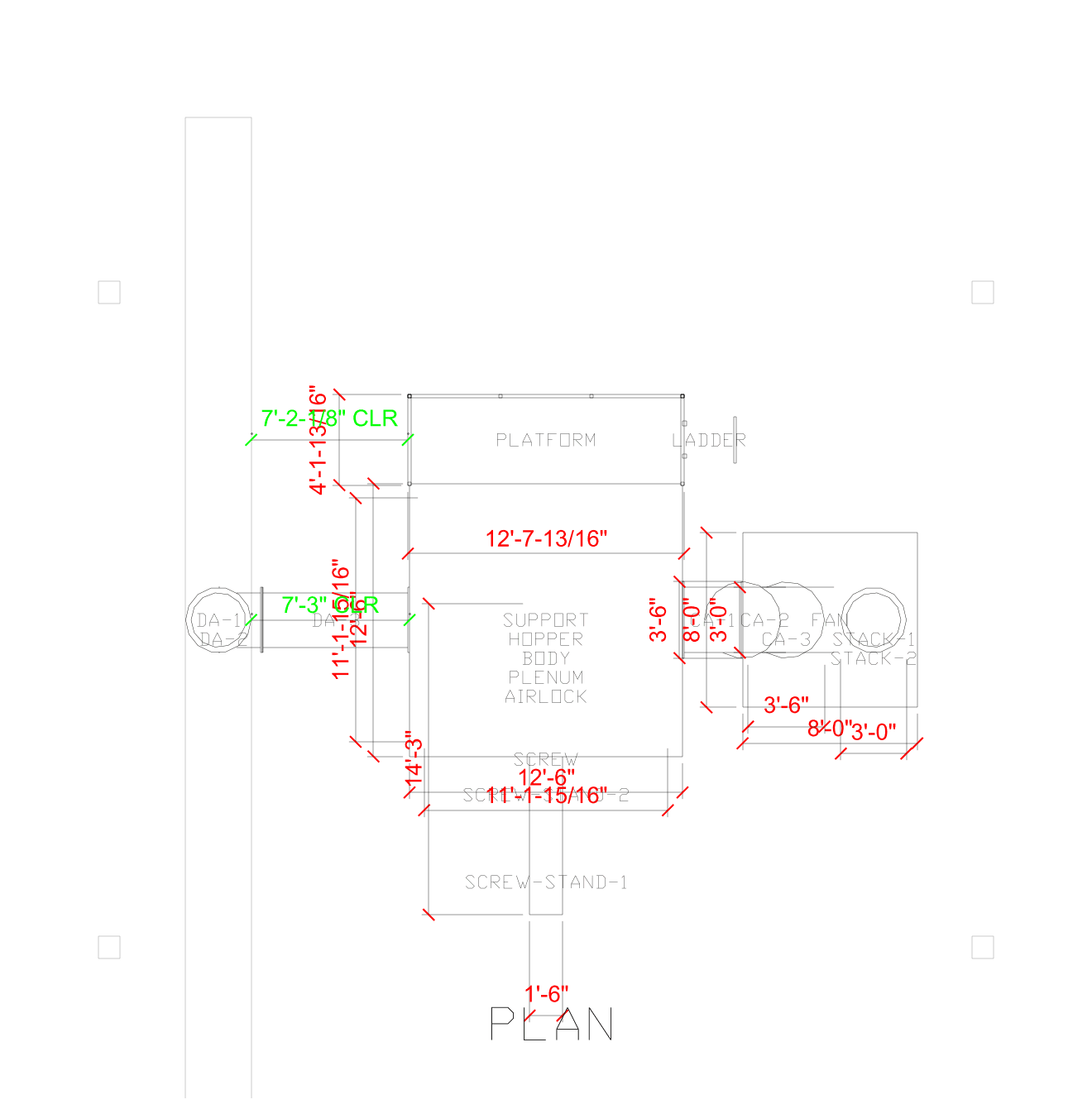
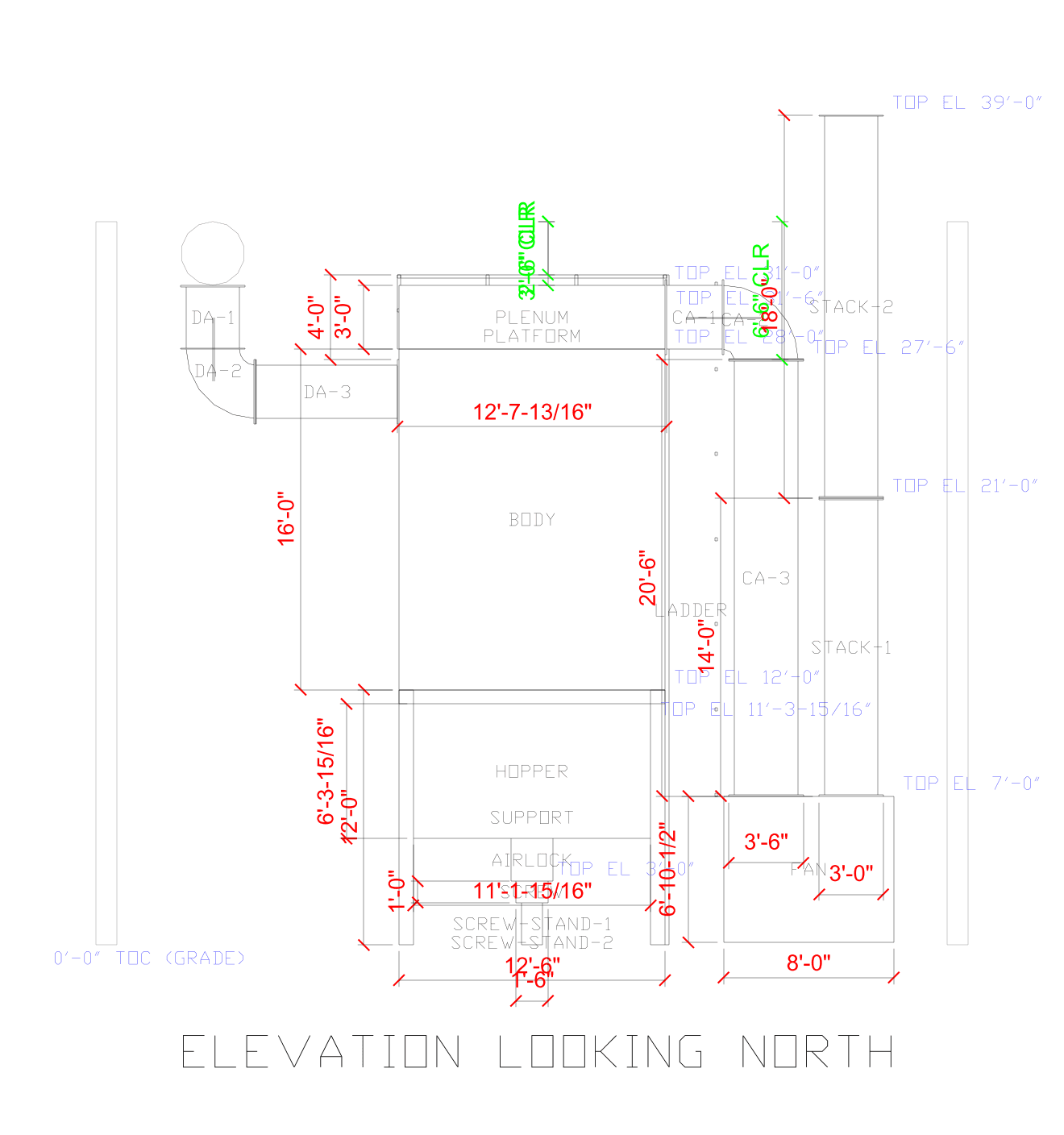
Plan and elevations for path clearance, and in Fab_it mode one dimensioned sheet per assembly with hole chains and a parts table.
BOM and pick register
Opens in Excel
Every piece with its weight and source sheet, every pick with set height and clear height above, the install sequence and loads.
3D viewer link
Opens in Any browser, phone or desktop
Step through the install in order. Send one link to the PM, the super and the owner. No software, no account.
Checks report
Opens in Your RFI log
Where the drawings disagree with each other, with both numbers, ready to send back as RFIs.
Dimensioned for path clearance
Every dimension is measured off the model, not typed in. Red: piece sizes. Green: clear height to roof steel and clear distance to columns and walls. Blue: top-of-piece elevations.
What the model proves
- Count
- Every piece on the list is in the model, and nothing in the model is off the list.
- Weight
- Totals match your takeoff, the vendor list and the foundation loads, or we show you where they don’t.
- Support
- Every piece sits on something. Nothing floats.
- Sequence
- Nothing gets set before the thing it sits on.
- Clash
- No two pieces in the same space, unless it is a real penetration and we say why.
- Headroom
- Clear height over every pick, so you know where a crane won’t work and a gantry has to.
- Path clearance
- Clear distance from every piece to the columns, walls and structure around it, dimensioned on the drawings.
- Holes and fit-up
- Fab_it mode: every bolt hole lines up with its mating part, and every hole chain matches the piece drawing.
How it works
1
Request it
Tell us who you are, what the job is and what drawings you have. No drawings yet.
2
We review it
Every run is real engineering time, so every request is reviewed. If it’s a fit, you get a private link and what the run takes.
3
Send the package
Through that link: GA, installation guide, foundation and vendor drawings, piece drawings, takeoffs, photos. PDFs are fine.
4
Get the model
STEP, DWG, DXF, the BOM, drawings and a viewer link, plus the list of what didn’t close, ready for your RFIs.
Questions
Can you make a 3D model from PDF drawings?
Yes. Most packages we get are PDFs: general arrangements, installation guides, vendor and foundation drawings, packing lists. We build the model from those, piece by piece, and tell you where the sheets disagree.
What file formats do I get?
A STEP assembly (Inventor, SolidWorks, Fusion and any CAD), an AutoCAD DWG of real solids, DXF plans and elevations, an Excel BOM and pick register, a checks report and a 3D viewer link that opens in any browser.
Is this an install plan or shop drawings?
Either. Project planning models the whole job: receiving, staging, set order, picks, headroom and path clearance. Fab_it mode models a fabricated assembly to shop quality: every member, hole and slot from its piece drawing, with dimensioned sheets and a cut list.
Who sees my drawings?
Only Accuwright staff. Drawings come in through a private one-time link after we approve the request, and the viewer link we send back is private to you, with an expiry we control.
What does it cost and how long does it take?
It depends on the size of the package. We review the request first and reply with what the run takes and when the model will be ready, before you send anything.
Do you do the installation too?
Yes. Accuwright Mechanical rigs, sets and installs industrial equipment. Build_it is how we plan our own jobs, and you can use the model whether or not we do the work.
Request Build_it
Tell us about you and the job. We review every request before anything runs.
- Don’t send drawings yet. Approved requests get a private, one-time link for the package.
- We reply with what the run takes and when the model will be ready.
- Only Accuwright staff ever see your drawings.
Rather talk it through? 877 898 4377